The Best Gym App for Serious Lifters: What to Look For in 2026

The best gym app for a serious lifter is one that makes the next session easier to organize: record the sets you perform, find comparable past work, and see the trend without rebuilding a spreadsheet. More features are useful only when they match how you train.
This guide is published by Setgraph and uses its logging workflow as one example. It is a feature-selection guide, not a hands-on ranking or a promise of better training results. For a short shortlist: consider Setgraph for an exercise-centered log, Hevy for logging with routines and social sharing, or Fitbod for generated workout suggestions. Hevy also supports empty workouts; you do not have to build a routine first.
What "best gym app" actually means depends on how you train
There is no single best gym app for everyone, and any honest roundup admits it. A powerlifter peaking for a meet, a physique competitor chasing every last bit of hypertrophy, and a busy parent squeezing in three sessions a week all need different things from the same category of software.
For a self-directed lifting log, a useful core task is finding what you did last time before choosing today’s work. If retrieving that history feels awkward, try another workflow. Guided sessions, social features, and demonstrations may still matter if those are part of what you want from a gym app.
So before you compare feature lists, get clear on your own situation. Do you follow a written program or decide at the gym? Do you want to log every set or only personal records? Do you care about long-term charts, or just need yesterday's numbers? Your answers narrow the field faster than any top-12 list. For a deeper breakdown of the category, our guide to the best workout tracker app covers how the pieces fit together.
Logging you can keep up with
A useful app fits the moments between sets. Look for a workflow you can repeat comfortably throughout a session, rather than choosing by the longest feature list.
Try entering a set, repeating it with one changed value, and correcting a mistake. Then find the previous session. This is a practical check you can perform yourself; we have not measured a universal tap count or logging-time advantage.
For convenient set entry, consider these features:
Pre-filled sets. Your next set is usually close to your last, so the entry screen should already show your most recent weight and reps. You confirm or nudge a number rather than typing from scratch.
Swipe-to-log shortcuts. Being able to swipe on an exercise to jump straight to recording, or swipe on a past set to re-log it with today's date, removes the tap-in-then-tap-record dance entirely.
Sensible sorting. Exercises sorted by most recently performed mean the thing you are about to do is already near the top.
These interactions are worth trying on your own device because convenience depends on your routine and preferences.
Progressive overload support: keep a comparable baseline
A log can support progressive overload by showing what you previously performed. It does not prescribe the right increase or guarantee strength or muscle growth. Training quality, recovery, and consistency still matter.
For example, if your plan calls for three sets of 8–10 reps, record 80 lb for 10, 10, and 9 as three separate sets. Next time, you might aim to complete the missing rep at the same load before considering a small increase. This is an illustrative rule, not a requirement to increase every session. Keep technique, range of motion, and rest reasonably comparable; shorter rest is not automatically better overload. Our progressive overload guide explains other ways to progress.
A useful notes field preserves context that the numbers miss: the equipment used, a change in technique, or your estimate of reps remaining. You do not need a bar-speed device or a particular failure threshold to choose a logging app.
Analytics that show trends, not just yesterday
Set history shows what you performed. Analytics can summarize changes in those records. Neither is a direct measurement of muscle growth or proof that the app caused a result.
Look for charts of load, reps, and volume that you can interpret alongside the underlying sets. More volume can come from additional sets, a different exercise, or changed technique. A flat line may reflect a planned maintenance or deload period rather than a reason to change the program immediately.
Be a little skeptical of apps that drown you in dashboards you will never read. The useful metrics for most lifters are simple: is the weight or volume on my main lifts going up over weeks and months? If an app surfaces that clearly, it is doing its job. Our piece on muscle recovery and workout analytics digs into which charts matter.
Recovery and exercise order: the details good apps respect
Two training variables that quietly shape results are recovery and exercise order, and the better gym apps give you a way to manage both.
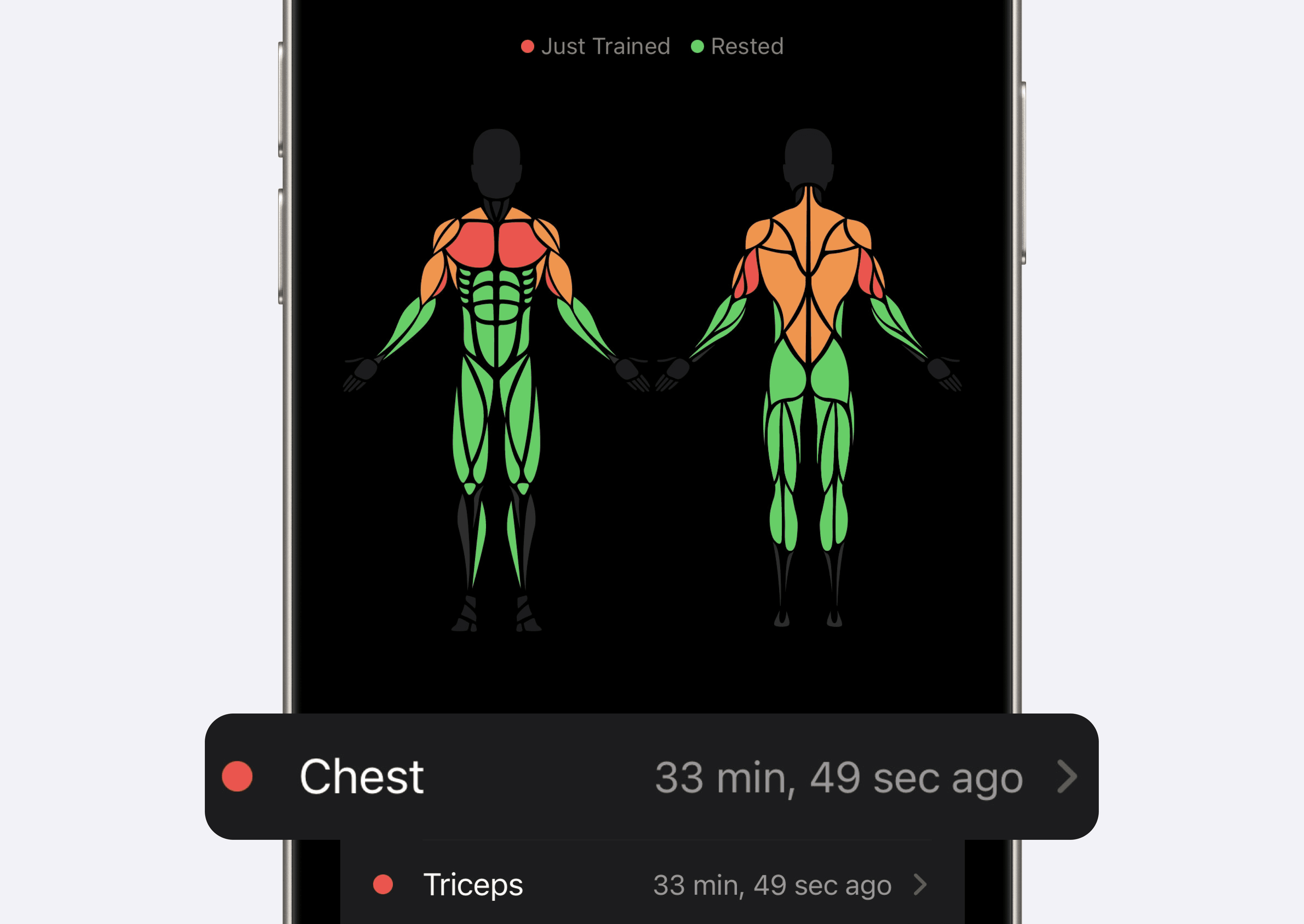
A muscle map can help you remember when a muscle group was trained. In Setgraph, the recovery indicator uses elapsed time since logged work and a configurable recovery goal. It does not measure physiological recovery or tell you that a sore or painful muscle is ready to train.
If a particular lift is your priority, arrange your exercise list to match the order in your program. An app that allows reordering helps preserve that plan when equipment availability changes. Keep a note when you change the order so later comparisons have context.
How to apply this in Setgraph
The following workflow is supported by Setgraph’s released iOS implementation. Setgraph is also available on Android, but that does not establish identical features or access on both platforms. Check the options available in your installed version.
Reuse a previous entry. From the exercise list, swipe to open the record screen. Review the pre-filled values and change them to match the set you actually performed. Sorting options can help organize the list. See the workout tracker overview for the core workflow.
Compare like sessions. Open the exercise’s history before choosing your next target. An exercise used in more than one workout keeps its exercise history together. Use the three-set example above to distinguish a missed rep from a planned load increase, then review load, reps, and volume in Analytics.
Use Muscle Recovery as a scheduling reminder. The Muscles tab displays a time-based indicator relative to your recovery goal. Combine it with your program, recent performance, and how you feel; its colors are not a medical or readiness assessment.
Need a starting plan? The AI Workout Generator accepts training goals and preferences. Review its output for your equipment, schedule, and ability before using it. Generated suggestions do not replace coaching or individualized advice.
FAQ
Q: What is the best gym app for beginners?
For a beginner, prioritize clear set entry, an exercise history you can find, and a plan you understand. Setgraph is one option for logging your own training; Fitbod is another option if generated workout suggestions are important. Use demonstrations or qualified instruction to learn technique rather than treating a tracking screen as coaching.
Q: Do I really need a gym app, or is a notebook fine?
A notebook can work well. An app may be more convenient if you want reusable entries, automatic totals, charts, or an integrated timer. Paper can also hold detailed records and manually drawn trends. Choose the method you will maintain accurately.
Q: What features actually matter most in a gym app?
Start with set entry, editable history, and readable progress charts. Then consider routine organization, notes, export, and the device you actually use. Recovery maps and social features are optional preferences, not requirements for effective training.
Q: Should the best gym app tell me what to do, or just track it?
If you already follow a program, a flexible log may be enough. If you need guidance, compare how a generated-plan app builds and lets you edit sessions. Neither approach guarantees that the plan suits every person.
Q: How do I know if an app is helping me progress?
Review comparable exercises across several sessions. More reps at the same load or more load for similar reps can indicate improved performance, but consider technique, effort, and training goals. A chart helps you review the record; it cannot establish that the app caused your progress.
Choose an app you can use accurately on an ordinary training day. Clear records and a manageable workflow are a better basis for the decision than an unsupported promise of faster gains.
Ready to train with a tool built for exactly that loop? Try Setgraph.