Why Duration Tracking Matters for Better Workout Logging
Duration tracking lets you log a timed set, such as a 45-second plank, alongside or instead of repetitions and weight. In Setgraph’s iOS workflow, enable the relevant exercise properties, use the set-entry timer or enter the completed duration, and save the set to history.
A workout is rarely made up of only barbell lifts and machine exercises. It often includes planks, wall sits, carries, hangs, mobility work, warmups, cooldowns, conditioning, tempo work, and bodyweight movements. Some of those exercises are measured by reps. Some are measured by load. Some are measured by time. Many are measured by a combination of all three.
That is why Duration Tracking and Exercise Properties are important. They make workout logging more accurate, more flexible, and more useful for the person training in the gym.
The iOS duration update introduced configurable exercise properties so each exercise can track reps, weight, duration or a combination. This guide describes that iOS workflow; available controls and access can differ by platform and version.
For the feature overview, including duration properties, Apple Watch and CSV support in the iOS update, read the duration-tracking announcement.
This article focuses on something different: why these changes matter, how they affect day-to-day training, and the practical benefits they bring to workout logging.
Workouts Are Not Always Reps and Weight
Traditional strength training is easy to log because the structure is obvious.
A bench press set might be:
8 reps
185 lb
A squat set might be:
5 reps
225 lb
But not every exercise fits that pattern.
A plank is not usually measured by reps. A dead hang is not usually measured by weight. A wall sit is not useful if the app asks for “10 reps.” A timed bodyweight hold might only need one field: how long you held it.
When an app only supports reps and weight, users have to work around the system. They might type time into a notes field, use reps as seconds, or skip logging the exercise entirely. Over time, those workarounds create messy data.
Duration Tracking solves this by making time a real tracked metric.
That means a 60-second plank is no longer a note. It is a set. It has structure. It can appear in history. It can contribute to summaries. It can be exported. It can be analyzed.
Exercise Properties Make Each Exercise Behave Correctly
Exercise Properties allow each exercise to define which metrics it uses:
Reps, Weight, and Duration can be enabled or disabled per exercise.
This matters because the best logging interface is the one that only asks for what is relevant.
For a plank, the user should only see duration. For dumbbell curls, they probably need reps and weight. For push-ups, they may only need reps. For a weighted carry, they may want weight and duration. For certain mobility drills, duration alone may be enough.
By making these properties configurable, Setgraph removes unnecessary fields from the set recording experience.
That has a practical benefit in the gym: less friction.
During a workout, the user is often tired, moving between equipment, watching rest time, adjusting weight, or trying to stay focused. Every unnecessary field adds small amounts of mental effort. Over a full workout, those small interruptions add up.
When the exercise only shows the metrics that matter, logging becomes faster and clearer.
Duration-Only Exercises Become First-Class Citizens
Before duration exists as a proper metric, timed exercises tend to feel secondary. They are often recorded inconsistently or treated as exceptions.
This update changes that.
A duration-only exercise can now be configured cleanly. For example, a plank can track Duration while Repetitions and Weight are disabled. That makes the exercise match the real-world movement.
This is important because timed exercises are not “extra.” They are a major part of many training programs.
Timed exercises are commonly used for:
Core stability
Isometric strength
Mobility and stretching
Conditioning
Warmups
Rehabilitation-style training
Bodyweight progressions
Grip endurance
Carries and holds
When these exercises are tracked properly, the user gets a more complete picture of their training.
A workout that includes 30 minutes of lifting and 15 minutes of timed core, mobility, and conditioning work should not look like only the lifting counted. Duration Tracking gives that work a place in the training record.
Inline Timers Reduce Context Switching
A major benefit of the new duration input is that it lives directly inside the set recording view.
That matters more than it might seem.
Without an integrated timer, users often have to switch between a workout app and a separate clock app. They start a timer elsewhere, return to the workout log, remember what happened, and then enter the result manually.
That workflow creates several problems.
It interrupts focus. It increases the chance of forgetting the exact time. It makes timed exercises feel separate from the rest of the workout. It also makes logging feel slower than it needs to be.
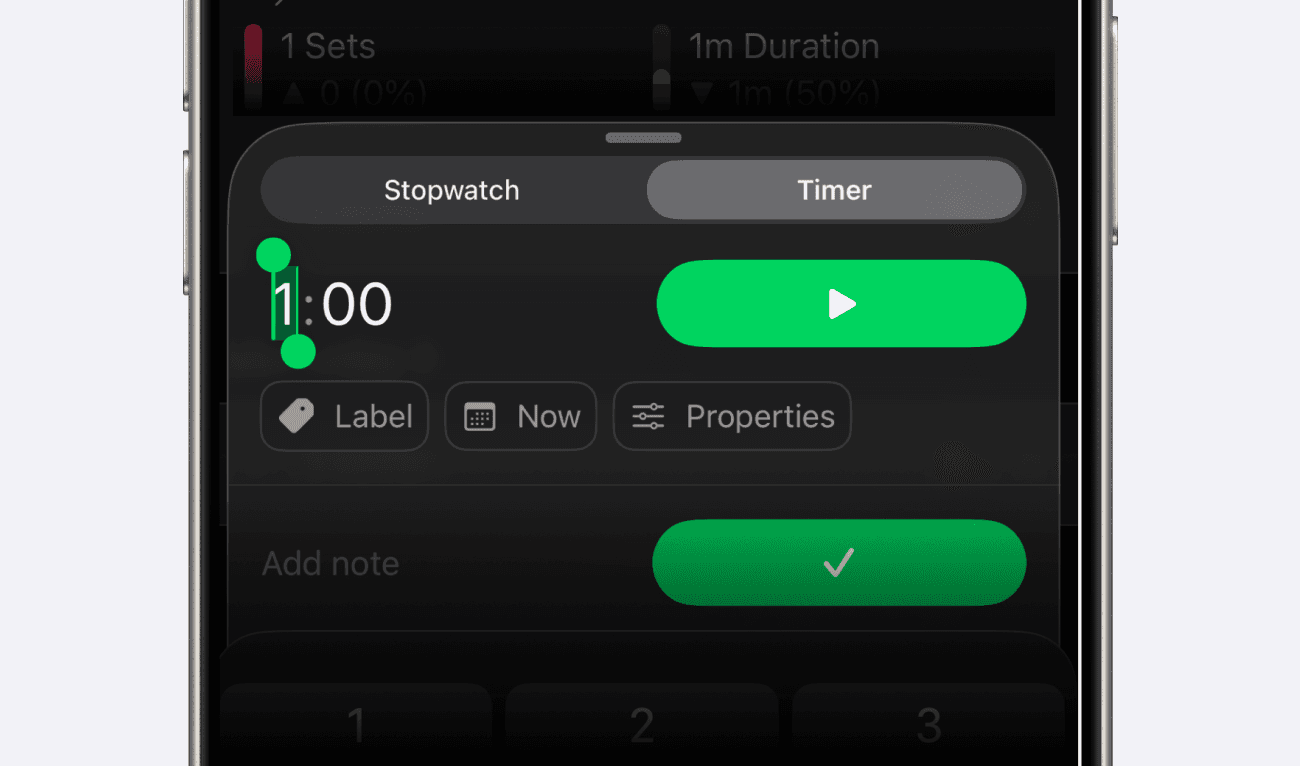
By embedding Stopwatch and Countdown Timer modes directly in the set recording view, Setgraph keeps the entire action in one place.
Start and stop the timer in the set-entry screen, check the resulting duration, then record the set. Recording is unavailable while the timer is running. If you stop early, save the time actually completed rather than the original target.
That makes timed training feel like a normal part of the workout instead of a separate task.
Stopwatch and Countdown Support Different Training Styles
Timed exercises are not all performed the same way.
Sometimes the goal is to measure how long you can hold something. Other times the goal is to complete a fixed amount of time.
That is why having both Stopwatch and Countdown Timer modes matters.
Stopwatch mode is useful when the user wants to measure performance. For example:
A user holds a plank for as long as possible. They start the stopwatch, stop when they break form, and save the final duration.
That is performance-based tracking.
Countdown mode is useful when the user already has a target. For example:
A user wants to complete a 45-second wall sit. They enter the target, start the timer, and stop when the countdown finishes.
That is prescription-based tracking.
Both are common in real workouts. Supporting both makes the feature more flexible and more natural.
Auto-Focus Makes Timed Sets Faster to Record
For a duration-only exercise, the iOS input can focus the minutes field automatically when Timer mode is selected. Stopwatch mode has different controls and does not require typing a target.
This is a small detail with a meaningful benefit.
This shortcut applies when Duration is enabled and Repetitions and Weight are disabled, with Timer mode active.
Auto-focus removes an unnecessary step.
In that configuration, open the duration-only exercise and enter the target time directly. For an open-ended hold, switch to Stopwatch instead.
Good workout logging should stay out of the way. Auto-focus helps do that.
Rest Timers Now Work for Duration Sets Too
Rest timing is one of the most important parts of structured training.
For strength work, rest periods influence performance, fatigue, and consistency. For timed exercises, rest still matters just as much.
A user doing three sets of planks might want 60 seconds of rest between attempts. A user doing timed carries may want a consistent rest interval before the next set. A user doing mobility or accessory circuits may want the same rest behavior they already use for rep-based sets.
When a rest timer is enabled and available in your app, logging a duration set can start the configured rest interval just as a rep-based set does.
That makes duration-based exercises fit into the normal workout flow.
Check the timer settings before relying on automatic rest timing. Recording a completed set and timing the work itself are separate steps.
Better History Means Better Progress Tracking
Workout history is only useful when it reflects what was actually tracked.
If an exercise does not use weight, showing a weight column is noise. If an exercise is duration-based, hiding duration makes the history incomplete.
Setgraph now adapts set history based on each exercise’s enabled properties. That means the history table changes depending on whether the exercise tracks reps, weight, duration, or a combination of those metrics.
This makes past performance easier to read.
For a plank, the user can focus on duration over time. For a dumbbell exercise, they can focus on reps and weight. For a weighted carry, they can see both load and duration.
Duration values use a yellow accent in the iOS set-history view; record-holding rows can use the record highlight instead. Compare the values and units rather than relying only on color.
Progress is not always “more weight.” Sometimes it is holding longer, moving longer, or sustaining effort more consistently. Duration history makes that progress visible.
Daily Summary Gives Timed Work a Place
A workout summary should reflect the whole workout, not just the parts that fit traditional lifting metrics.
The Daily Summary Duration stat totals the durations recorded on sets. It is separate from total session time, so rest and unrecorded activity are not automatically included.
This matters because duration-based exercises can represent a significant amount of effort. A session might include planks, carries, holds, stretching, mobility work, and timed accessory work. Without a duration stat, that effort may be hidden.
A daily duration metric helps users understand how much time-based work they completed.
It also helps users compare training days more accurately. One day might have more volume from reps and weight. Another might include more time under tension, holds, or conditioning-style work. Duration gives another dimension to the workout.
Duration Analytics Make Time-Based Progress Measurable
Logging duration is useful. Seeing duration trends over time is even more useful.
By rendering duration analytics in minutes, Setgraph makes time-based training easier to understand at a glance.
This helps users answer questions like:
Are my plank holds longer under the same technique and stopping rule?
How much duration have I recorded for mobility work?
How do timed sets compare at the same load?
Did a change in setup or exercise variation affect the comparison?
For many exercises, progress happens gradually. A user may move from 30 seconds to 40 seconds, then 45 seconds, then 60 seconds. That kind of progress can be easy to miss if duration is buried in notes or recorded inconsistently.
When duration is structured and visualized, progress becomes clearer.
Smarter Analytics Avoid Misleading Data
Another important part of this update is analytics gating.
The 1RM tab requires both weight and repetitions to be enabled. Duration-only or weight-and-duration exercises therefore do not show that tab. Other analytics also follow the exercise’s enabled properties.
That matters because analytics should be relevant to the exercise.
For example, a duration-only plank should not have a 1RM tab. A weighted carry that tracks weight and duration still lacks a repetition count, so it is not enough to enable 1RM analysis.
By hiding analytics that do not apply, Setgraph makes each exercise page cleaner and more trustworthy.
This is not just a visual improvement. It protects the quality of the interpretation.
Users should not have to decide which charts matter and which ones are artifacts of a generic system. The app should understand the exercise’s properties and show only the analytics that make sense.
CSV Export Makes Duration Data Portable
The iOS set CSV export includes duration in seconds and a formatted duration column. Check the export options and access available in your app; this does not establish equivalent Android export.
This is important for users who like to analyze their training outside the app, share data with a coach, or keep long-term backups of their workout history.
If duration is a real metric in the app, it should also be a real metric in exports.
The duration columns let you review timed sets in a spreadsheet. Check the exported file against the period and entries you intended to save before treating it as a complete backup.
This is especially valuable for advanced users, coaches, and anyone who wants their training data to remain accessible.
Apple Watch Support Matters During Real Workouts
Duration-aware set recording on Apple Watch is especially useful because timed exercises are often performed away from the phone.
A user might be on the floor holding a plank, carrying dumbbells across the gym, hanging from a pull-up bar, or moving through a timed circuit. In those moments, reaching for a phone can be inconvenient.
Apple Watch support makes duration tracking more practical.
The iOS duration update includes Apple Watch recording. Check the controls available on your installed version and complete the required iPhone setup before relying on the Watch during training.
A feature is only valuable if people can use it when they actually need it. Watch support helps make duration tracking accessible during the movement itself.
Seeded Duration Exercises Help Users Start Faster
Setgraph now includes new bodyweight and duration default exercises in the exercise library.
This matters because users should not have to manually configure every common timed exercise from scratch.
When duration-friendly exercises are available by default, users can start logging them immediately. This also helps introduce the new tracking model naturally.
Check the properties when adding a timed exercise from the library, and enable the fields that match how you perform it. Default exercise settings can vary with the selected movement and app version.
Better defaults lead to better data.
More Accurate Logging Leads to Better Training Decisions
The biggest benefit of this update is not just that Setgraph can track time.
The bigger benefit is that workouts become more accurately represented.
Accurate logs help users make better decisions.
Longer holds or carries can be a useful performance trend when the movement, load, technique and stopping point stay comparable. A longer recorded duration alone does not establish better endurance or an appropriate weekly workload.
Workout tracking is not only about recording what happened. It is about creating a useful memory of training.
The more accurately that memory reflects the workout, the more valuable it becomes.
Why This Matters in the Gym
In the gym, every second of attention matters.
A good workout app should support the session without pulling the user out of it. It should reduce guesswork, reduce unnecessary taps, and make logging feel natural.
Duration Tracking and Exercise Properties help with that in several ways:
Choose the fields relevant to the exercise.
Keep timed-set entry inside the recording flow.
Use configured rest timers where enabled and available.
Review history and applicable analytics.
Include recorded duration in the supported iOS summary, export and Watch workflow.
Together, these changes make Setgraph better suited to the way people actually train.
A workout is not just reps and weight. It is effort across time, load, movement, and consistency. This update gives users a more complete way to capture that effort.
A More Flexible Foundation for Workout Tracking
Duration Tracking and Exercise Properties also create a stronger foundation for future workout tracking.
Once exercises can define their own metrics, the app can become more adaptive. Instead of treating every exercise the same way, Setgraph can shape the recording experience around the exercise itself.
That makes the app more precise for strength training, bodyweight training, mobility work, conditioning, and hybrid routines.
For users, the result is simple:
The workout log feels more like the workout.
And when the log matches the workout, the data becomes easier to trust, easier to review, and more useful over time.